Meet Vera. She makes your product data true.
Tell Vera what you need in plain English and she does the product data work, so every rep, service agent, and AI agent works from a complete, correct record. Nothing changes until you approve it.
Vera is the product data expert inside Pimly Product Intelligence, now in limited availability. She builds new products from your engineering documents, finds and fixes gaps across your catalog, and restructures families and catalogs from a description.
Vera is the product data expert inside Pimly Product Intelligence, now in limited availability. She builds new products from your engineering documents, finds and fixes gaps across your catalog, and restructures families and catalogs from a description.
Book a Demo
New products go live in minutes, not weeks.
Today, launching a product line means engineering sends spec sheets and spreadsheets, someone rekeys them into families, properties, and products, and every handoff waits on an approval. It takes weeks.
With Vera, you drop the engineering PDFs into the chat and ask her to build the products. She proposes the families, properties, products, and parent hierarchy, and links the images you already have. You review once and click Approve. In our demo, Vera built 44 governed records from an engineering package in about four minutes.
With Vera, you drop the engineering PDFs into the chat and ask her to build the products. She proposes the families, properties, products, and parent hierarchy, and links the images you already have. You review once and click Approve. In our demo, Vera built 44 governed records from an engineering package in about four minutes.

Every gap found, every fix reviewed.
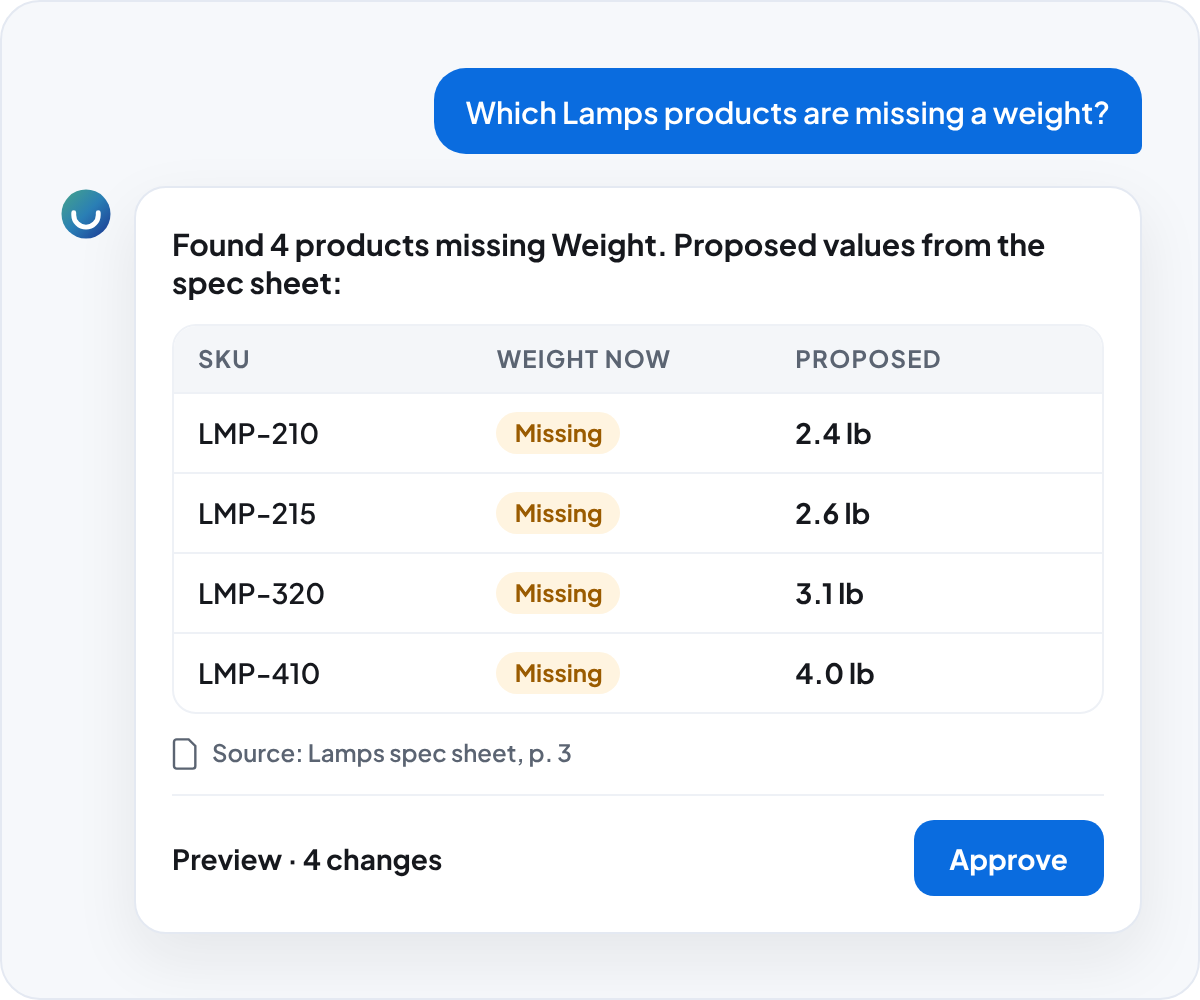
Ask "which Lamps products are missing a weight?" and Vera finds them. Ask her to fill them in from the spec sheet, or to clear, copy, or correct a value across the whole set.
Up to 500 records change directly in the conversation. Bigger jobs run in the background on up to 50,000 records, with a full report of every change before the job starts and undo for 90 days. Undo only reverts fields nobody has touched since, so a colleague's later edits are never lost.
Up to 500 records change directly in the conversation. Bigger jobs run in the background on up to 50,000 records, with a full report of every change before the job starts and undo for 90 days. Undo only reverts fields nobody has touched since, so a colleague's later edits are never lost.
You approve every change.
Every change Vera proposes appears first as a preview card. Nothing is written until you click Approve, and Vera can't approve on your behalf. If someone else changed a record after the preview, Vera skips it and tells you, instead of overwriting newer work.
Every change is recorded field by field in a tamper-evident audit trail that never expires, so you can always see what changed, when, and who approved it.
Every change is recorded field by field in a tamper-evident audit trail that never expires, so you can always see what changed, when, and who approved it.

Your catalog structure, built by describing it.
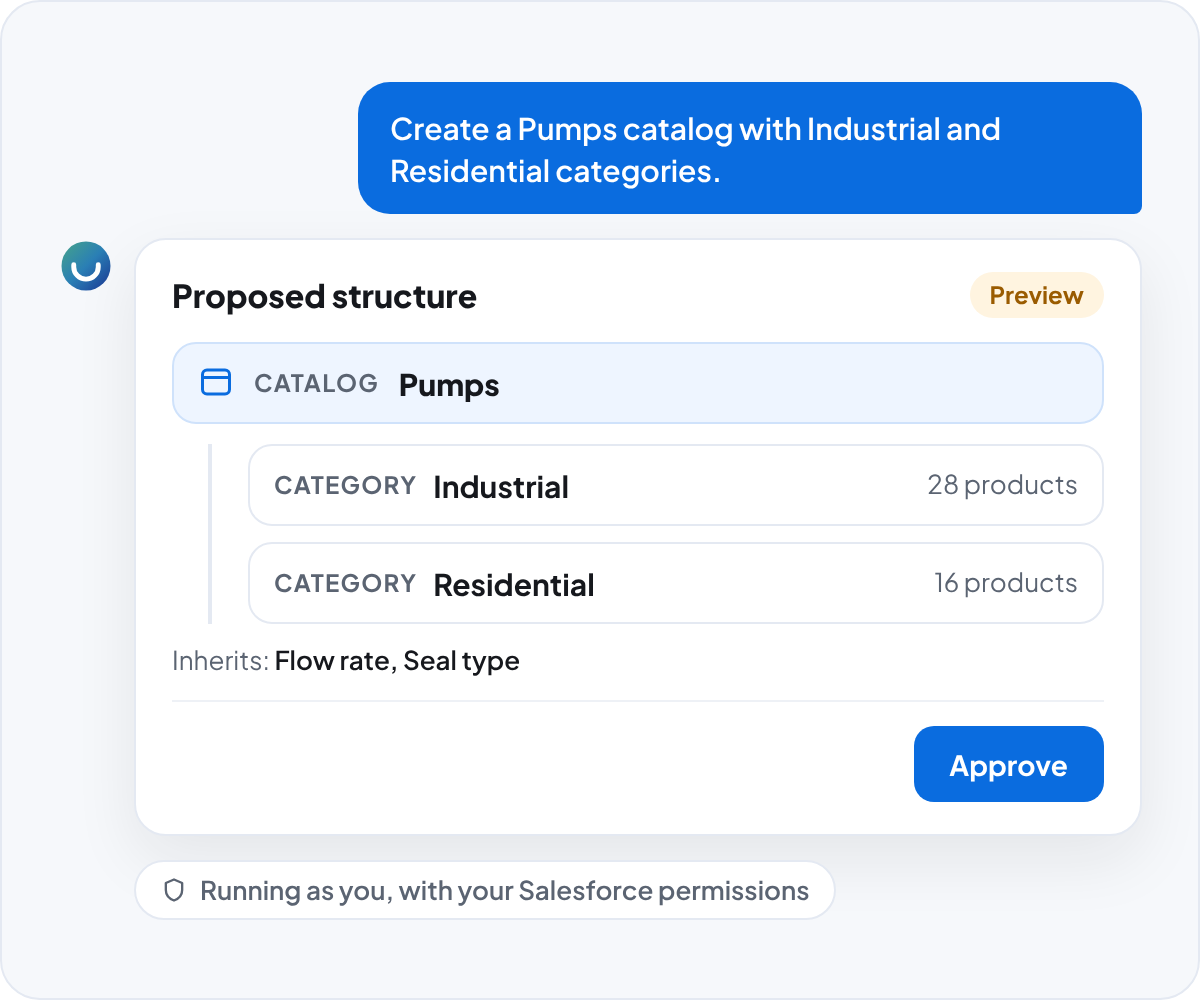
New families, inheritance models, catalogs, and categories used to mean a services project or a long afternoon in setup screens. Now you describe the structure you want, and Vera builds it and assigns products to it.
She works as you. Vera signs in with your identity, so Salesforce enforces your permissions on every lookup and every change. Read-only users can ask Vera questions but can never change data.
She works as you. Vera signs in with your identity, so Salesforce enforces your permissions on every lookup and every change. Read-only users can ask Vera questions but can never change data.
A product data expert for every team

A catalog ready for every new channel
Getting products ready for a new storefront, region, or distributor becomes one reviewed job. Vera sets and copies values, runs exact find-and-replace, and adds or removes related products across the catalog.

Answers from your spec sheets
Attach a PDF, such as a supplier spec sheet, and ask Vera about it or have her propose product updates from it. She reads the right section, page range, or table.

No extra AI licenses
Vera lives inside Pimly and needs no Agentforce, Einstein, or Data Cloud license. Pimly turns her on, your admin assigns access, and your team opens the Vera tab.
See Vera working on your own products.
Book a Demo
Frequently Asked Questions
Vera finds, creates, and updates product data in Pimly: products, parents, families, properties, channels, locales, catalogs, categories, and inheritance models. She reads PDFs you attach and proposes updates from them, and she runs large changes as background jobs you review before they start.
Vera can't delete or archive records, publish or sync to channels, run reports, or create images. She works strictly within each user's permissions, and every change waits for a person to approve it.
Vera runs on Anthropic's Claude models inside Pimly's secure cloud environment. Anthropic has no access to your prompts or responses.
No. Your prompts, responses, and product data are never used to train AI models. Every change Vera makes is recorded in a permanent audit trail you can review in Salesforce.
No. Vera is Pimly's own assistant and needs no Agentforce, Einstein, or Data Cloud license. Your team needs Pimly licenses and access to Vera, which your Salesforce admin assigns.